Do You See a Green Dot on Your Android Phone? Here’s What It Means
Have you ever been using your Android phone and suddenly noticed a small green dot in the upper-right corner of the screen?
For a moment, you might wonder:
“Is someone watching me?”
“Is an app secretly recording me?”
“Does this mean my phone has been hacked?”
In most cases, there is a much simpler explanation.
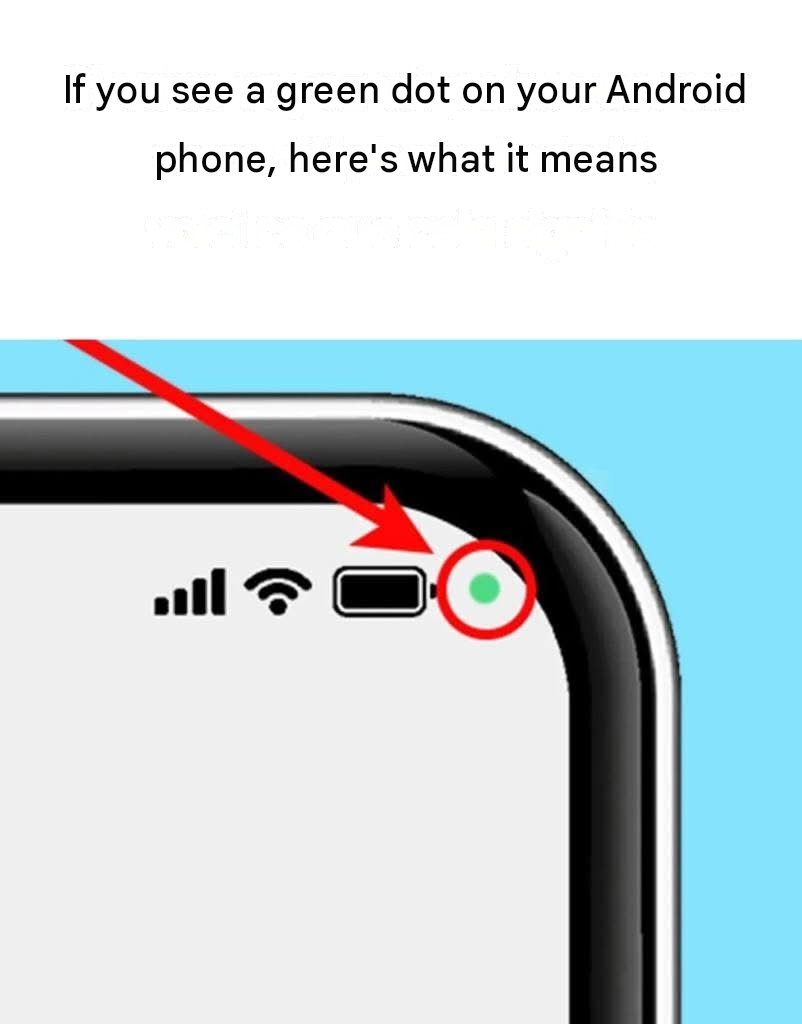
The green indicator is a privacy feature built into modern versions of Android. It is designed to let you know when an app or service is actively accessing your phone’s camera or microphone. Google says the indicator is available on Android 12 and newer devices, although the exact appearance and location can vary between manufacturers. (Assistance Google)
Rather than being something to fear, the green dot is actually intended to give you more information about what your apps are doing.
What Does the Green Dot Mean?
When an application is using your phone’s camera or microphone, Android displays a green privacy indicator near the top of the screen.
For example, it can appear when you are:
Making a video call
Taking a photograph
Recording video
Recording audio
Using voice features
Using an application that requires microphone access
Using an application that requires camera access
Android’s privacy system tracks camera and microphone access and provides an on-screen indicator so that users can see when these sensitive sensors are being accessed. (Android Open Source Project)
The indicator doesn’t automatically mean that something malicious is happening.
It often simply means that an app you intentionally opened is using a feature you gave it permission to use.
Why Did Android Introduce the Green Indicator?
Your camera and microphone are among the most privacy-sensitive components of your phone.
A camera can see your surroundings.
A microphone can hear conversations.
Without an indicator, it could be difficult for users to know when an application was actively accessing these sensors.
Android introduced privacy indicators as part of its broader privacy controls in Android 12.
The goal is transparency: your phone should give you a visible signal when sensitive sensors are being accessed. (Android Open Source Project)
This means the little green dot isn’t necessarily a warning that something is wrong.
It’s more like a notification:
“An app is currently using your camera or microphone.”
Which Apps Can Cause the Green Dot?
Many completely legitimate apps can activate the indicator.
For example:
Camera Apps
Opening your camera obviously requires access to the camera sensor.
The green indicator may therefore appear while you’re taking pictures or recording video.
Video Calling Apps
Apps used for video calls may need both the camera and microphone.
The indicator can appear during the call.
Voice Recording Apps
A voice recorder needs microphone access.
The green indicator can therefore appear while you’re recording.
Messaging Apps
If you send a voice message or make a video call through a messaging application, the microphone or camera may be accessed.
Voice Assistants
Certain voice-related features can require microphone access.
Social Media Apps
Some social media applications use the camera or microphone when you create videos, take pictures, record stories, or make calls.
So seeing the green dot while intentionally using one of these functions isn’t unusual.